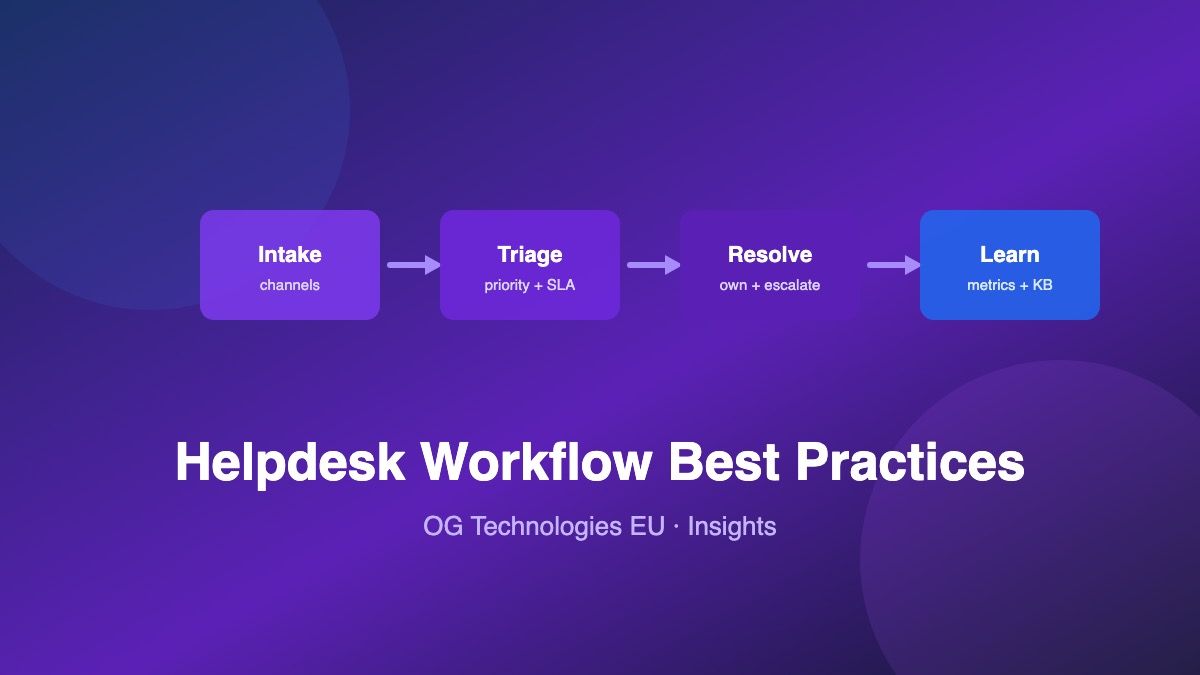
Most helpdesks do not fail because of bad software — they fail because there is no defined workflow. Tickets arrive through five channels, sit unassigned, get answered twice or not at all, and nobody can say how long resolution actually takes. A workable helpdesk process has four stages: intake, triage, resolve, learn. Here is how to run each one.
1. Intake: One Queue, Every Channel
Customers will contact you however is easiest for them — email, a contact form, a chat widget, a phone call somebody writes down. The first rule of helpdesk workflow is that every one of these lands in a single queue. The moment tickets live in multiple places, the unmonitored one becomes a black hole.
- Auto-acknowledge everything. An immediate "we received your request, ticket #1234" reply costs nothing and eliminates the most common follow-up: "did you get my email?"
- Capture context at creation. Link every ticket to a customer record — company, plan, open deals — so agents start with context instead of asking for it.
- Log phone/chat requests too. If it was not ticketed, it did not happen — and it cannot be measured or handed over.
2. Triage: Priority Before Order
Working a queue strictly top-to-bottom feels fair and is wrong. Triage means every new ticket gets two things within minutes: a priority and an owner (or at minimum an owning queue).
Set priority from impact × urgency, not from how loudly the customer writes. A simple four-level scheme works for most teams:
- Urgent — service down, data loss, security issue. Drop everything.
- High — core feature broken for a customer, no workaround. Same-day response.
- Normal — standard questions and issues with workarounds. The bulk of the queue.
- Low — feature requests, cosmetic issues, "nice to have." Batch-review weekly.
Attach an SLA target to each level — e.g., first response within 1 hour for urgent, 4 hours for high, one business day for normal — and let the queue sort by breach risk, not arrival time.
3. Resolve: Ownership and Escalation
A ticket without a named owner is a ticket that will be answered late, twice, or never. Assign every ticket to one person who owns it to closure — even when others contribute.
- Define escalation paths before you need them. Who gets paged for an urgent ticket at 18:00? What is the path from L1 to engineering? Write it down; escalation by improvisation is how incidents become outages.
- Separate internal notes from customer replies. Agents need a place for candid technical discussion that customers never see — keep both on the ticket thread.
- Use statuses honestly. Open → in progress → waiting on customer → resolved. "Waiting on customer" is a legitimate state that keeps your open count meaningful; letting it mean "we forgot" is not.
- Close the loop. A resolution without a confirmation message is a guess. Tell the customer what fixed it.
4. Learn: Metrics and the Knowledge Loop
The fourth stage is what turns a cost center into an asset. Four numbers tell you almost everything:
- First response time (FRT) — how fast a human acknowledges a ticket. The single strongest driver of customer satisfaction.
- Resolution time — ticket open to resolved, segmented by priority.
- Backlog and aging — open ticket count and, critically, the age of the oldest ones. A growing tail means triage is failing.
- CSAT or a simple resolved-well check — did the customer confirm the fix?
Then feed what you learn back upstream: recurring questions become canned replies, canned replies become knowledge-base articles, and knowledge-base articles deflect tickets before they are written. Every repeated ticket is a documentation bug.
Automation: Where the Leverage Is
Automate the mechanical parts so humans handle the judgment calls: auto-assignment by category or round-robin, status transitions on customer reply, SLA breach alerts, and follow-up nudges on stale tickets. Start small — assignment and acknowledgment — and add rules only when you see a pattern worth encoding. Automating a broken triage process just breaks it faster.
Putting It Together
The workflow above assumes tickets and customer records live in the same place — which is why we built OG CRM & Ticketing with the helpdesk on top of the contact record: agents see the customer's companies, deals, and activity while they work the ticket, and the queue tracks status, priority, and ownership end to end. The free tier on our pricing page is enough to run this exact workflow with a small team — or request a demo and we will walk through it with your real queue.
Frequently Asked Questions
What is a good first response time?
Depends on channel and priority, but as a baseline: under 1 hour for urgent issues, under 4 business hours for high priority, under one business day for normal tickets. Consistency matters more than raw speed — a reliable 4-hour response beats an erratic 30-minute one.
How many priority levels should we use?
Four is the practical maximum: urgent, high, normal, low. More levels means triage meetings about edge cases instead of answers. If two levels are routinely treated the same, merge them.
When should a ticket be escalated?
Three triggers: SLA breach risk (the clock will run out before resolution), capability (the owner cannot solve it — route it to who can, fast), and business risk (the ticket involves a churn-threatened or high-value account). Escalate early; a late escalation costs more than a premature one.
Should support agents see CRM data?
Yes — customer context (plan, renewal dates, open deals, past tickets) changes how a ticket should be handled and often what the right answer is. That is the core argument for a unified CRM + ticketing platform over two separate tools.