OData (Open Data Protocol) is the OASIS-standardized query language for REST APIs — also published as ISO/IEC 20802 — that turns a URL into a structured database query. If you work with SAP Gateway, Microsoft Dynamics 365, SharePoint, Microsoft Graph, or Salesforce Connect, you write OData URLs whether you call them that or not. The protocol defines a set of system query options — reserved parameters starting with $ — that control filtering, projection, expansion, sorting, and paging.
Anatomy of an OData URL
{service-root}/{EntitySet}('key')?{query-options}

https://host/sap/opu/odata/sap/SALESORDER_SRV/SalesOrderSet
  ?$filter=TotalAmount gt 1000
  &$select=SalesOrderID,CustomerName,TotalAmount
  &$orderby=TotalAmount desc
  &$top=10
  &$format=json
Everything before the ? addresses a resource — the service root, then an entity set, optionally a key like SalesOrderSet('500000123') for a single record. Everything after it is a query option evaluated server-side. Options combine freely with &.
$select — Return Only What You Need
$select is a projection: a comma-separated list of properties to return. $select=SalesOrderID,CustomerName returns just those fields. It is the cheapest performance win available — entity types in SAP regularly carry dozens of properties, and omitting $select pulls them all over the wire.
$filter — The Operator Reference
$filter takes a Boolean expression evaluated per entity. The core operators:
| Operator | Meaning | Example |
|---|---|---|
| eq / ne | equal / not equal | Status eq 'Open' |
| gt / ge | greater than / or equal | TotalAmount ge 1000 |
| lt / le | less than / or equal | CreatedAt lt 2026-01-01T00:00:00Z |
| and / or / not | logical combination | Status eq 'Open' and TotalAmount gt 100 |
| contains() | substring match (V4) | contains(CustomerName,'Acme') |
| startswith() / endswith() | prefix / suffix match | startswith(CustomerName,'Ac') |
| tolower() / toupper() | case normalization | tolower(CustomerName) eq 'acme gmbh' |
| year() / month() / day() | date parts | year(OrderDate) eq 2026 |
| substringof() | substring match (V2) | substringof('Acme',CustomerName) |
Watch the literal syntax: strings take single quotes (eq 'Open'), numbers are bare, and dates differ by version — V2 uses datetime'2026-01-01T00:00:00', V4 uses bare ISO 8601. Two syntax traps cause most failures: V2 vs V4 string functions (substringof('x',Field) in V2 becomes contains(Field,'x') in V4 — note the reversed arguments), and URL encoding — spaces and quotes must be percent-encoded, which is exactly where a builder tool earns its keep.
$expand — Joining Related Entities
$expand inlines navigation properties — the OData equivalent of a JOIN. $expand=ToLineItems on a sales order embeds its items in the same response instead of forcing a second request. In OData V4 you can nest query options inside the expand: $expand=ToLineItems($select=Product,Quantity;$top=5;$filter=Quantity gt 2) — a feature SAP V2 services do not support, where all items come back unfiltered.
$orderby, $top, $skip, $count — Sorting and Paging
$orderby=TotalAmount desc— sort by one or more properties (ascis default)$top=10— return at most N entities$skip=20— skip N entities; combined with$topit implements paging$count=true— include the total matching count ($inlinecount=allpagesin V2)
One SAP-specific caveat: many SAP Gateway services ignore client-side paging or cap $top server-side — check for a __next link in the response and follow it rather than assuming you got everything.
SAP Gateway Specifics
- Service URLs follow
/sap/opu/odata/sap/{SERVICE_NAME}_SRV/, with entity sets typically namedXxxSet(e.g.,SalesOrderSet). Fetch$metadatafirst — it is the service's data dictionary: entity types, properties, keys, and navigation names. $format=jsonis effectively mandatory on SAP V2 services, which default to verbose Atom XML. V4 defaults to JSON.sap-clientis a custom (non-$) query option many systems require, e.g.sap-client=100.- Writes need a CSRF token — GET the service with
x-csrf-token: Fetch, then replay the returned token on POST/PATCH/DELETE. - Property names are case-sensitive and must match
$metadataexactly —totalamount≠TotalAmount.
Build and Test a URL
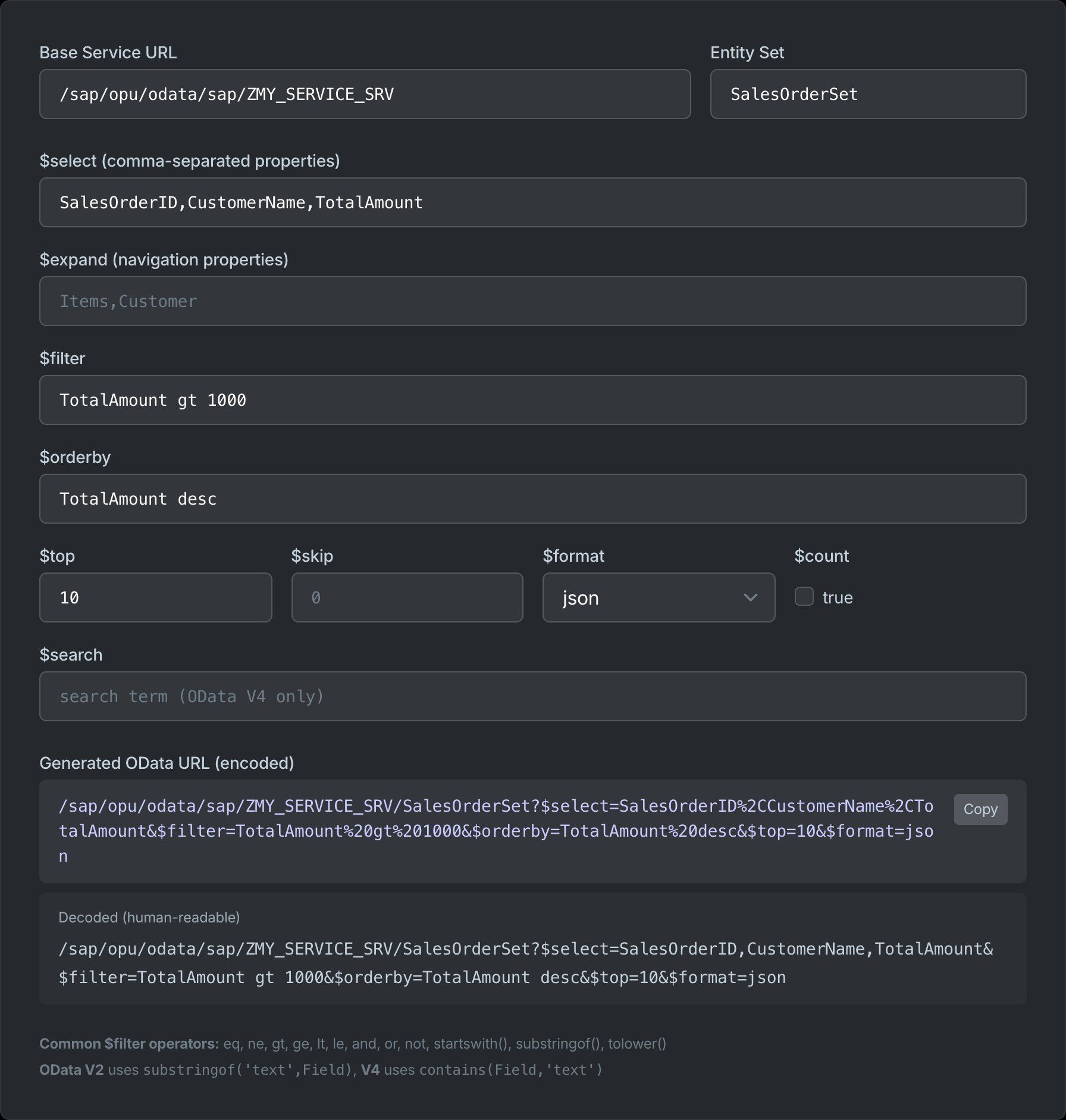
The fastest way to learn the syntax is to see the encoded result as you type. Our SAP OData URL Builder assembles $select, $expand, $filter, $orderby, $top, $skip, $format, $count, and $search into a correctly encoded URL — and shows the decoded form so you can verify it reads the way you intended. Then paste the URL into a browser or Postman against your system's $metadata-verified property names.
Frequently Asked Questions
What is the difference between OData V2 and V4?
V4 (the OASIS/ISO standard) simplified the protocol: JSON became the default format, substringof('x',F) became contains(F,'x'), date literals dropped the datetime'' wrapper for bare ISO 8601, $inlinecount became $count, and $expand gained nested query options. Most SAP Gateway services are still V2 — check the service metadata before writing queries.
Is OData still relevant?
Very much so in enterprise software. Every SAP S/4HANA Fiori app talks to OData services, Microsoft Graph is an OData API, and Dynamics 365, SharePoint, and Teamcenter all expose it. GraphQL displaced it in new public APIs, but inside the SAP and Microsoft ecosystems OData remains the standard data access layer.
What is the difference between $filter and $search?
$filter evaluates structured predicates against named properties — Status eq 'Open'. $search performs full-text search across the entity where the server supports it — $search=invoice. Filter is exact and deterministic; search is implementation-defined and only exists in OData V4.
How do I test an OData URL before using it in code?
Paste it into a browser — OData GET requests need no tooling beyond a login session. Start with $metadata to confirm property names, build the URL with our OData URL Builder, and add $top=5 while iterating so you do not pull entire entity sets.