
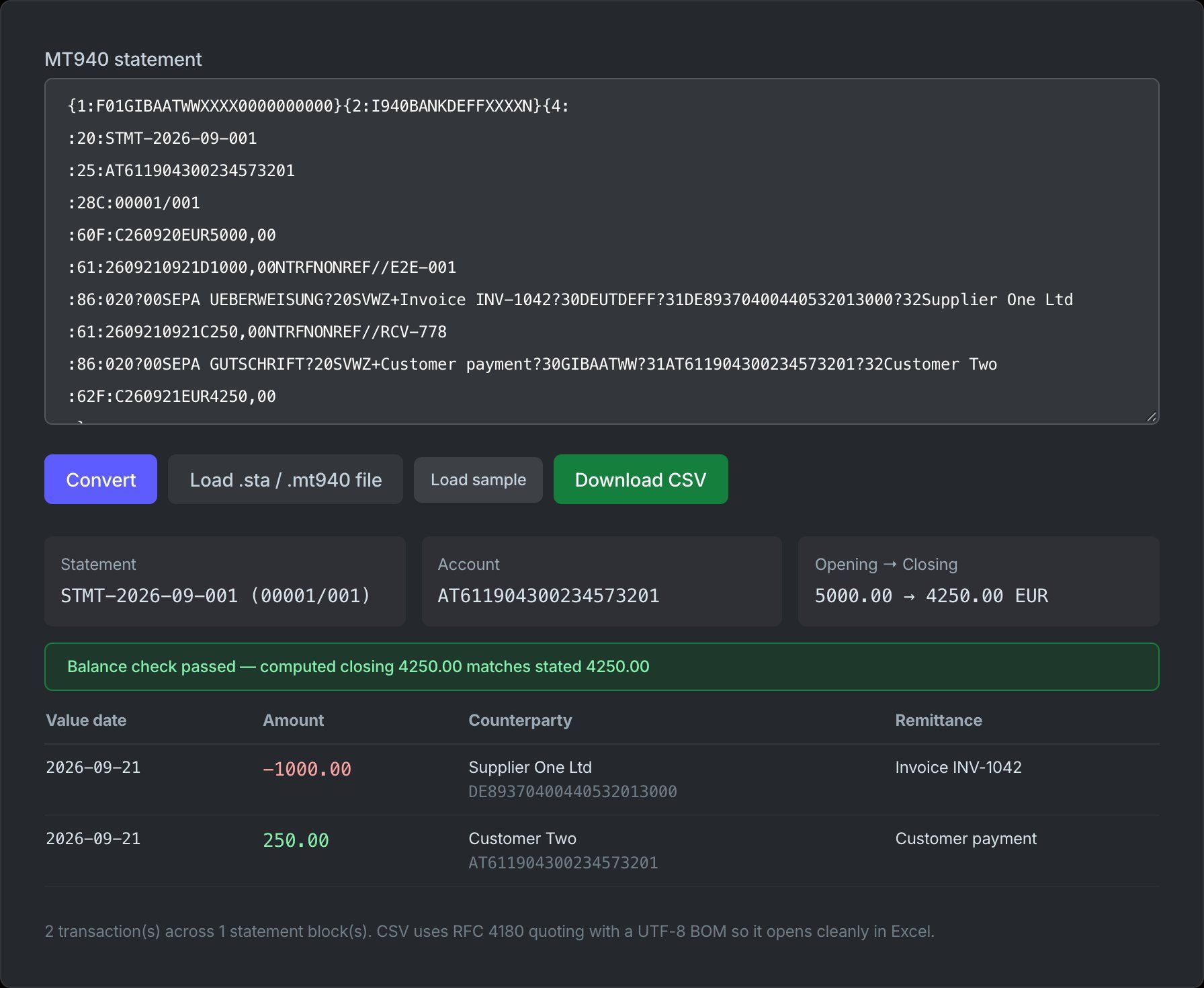
The SWIFT MT940 — Customer Statement Message — is the end-of-day bank statement format that corporate treasuries, accountants, and ERP systems have consumed for decades. Delivered as .sta or .mt940 files through EBICS, host-to-host banking, or online banking exports, it encodes opening and closing balances plus every booked transaction in a compact, line-oriented tag structure. It is now being succeeded by the ISO 20022 camt.053 XML statement — but MT940 remains the format most finance teams actually receive, and the one most "import my bank statement into Excel" searches are really about.
The Tag Structure at a Glance
An MT940 file contains one or more statements. Each statement is a sequence of fields introduced by a colon-delimited tag (:20:, :61:, …). A file may also arrive wrapped in SWIFT envelope blocks ({1:…}{2:…}{4: … -}) — strip those before parsing the tags themselves.
| Tag | Name | Content |
|---|---|---|
| :20: | Transaction reference | Sender's unique reference for the statement (max 16 chars) |
| :21: | Related reference | Optional reference to a related message |
| :25: | Account identification | IBAN or proprietary account number — may include the bank's BIC |
| :28C: | Statement / sequence number | e.g. 00123/001 — statement number plus page sequence |
| :60F: / :60M: | Opening balance | C/D mark + YYMMDD + currency + amount; F = final, M = intermediate |
| :61: | Statement line | One booked transaction: dates, amount, transaction code, references |
| :86: | Information to account owner | Remittance / booking text attached to the preceding :61: |
| :62F: / :62M: | Closing balance | Same shape as :60: — the balance after all listed entries |
| :64: | Closing available balance | Optional — the balance actually available for withdrawal |
| :65: | Forward available balance | Optional — projected available balance at a future date |
Field :61: — The Statement Line
Each booked transaction occupies one :61: line. A real line looks like this:
:61:2609210921C250,00NTRFNONREF//RCV-778
260921— value date (YYMMDD)0921— optional entry date (MMDD)C— debit/credit mark:Ccredit,Ddebit,RC/RDreversal of a credit/debit250,00— amount, always with a comma as decimal separatorNTRF— transaction type:N+ three-letter code (TRFtransfer,DDTdirect debit,MSCmiscellaneous,CHKcheque,INTinterest…)NONREF— customer reference (orNONREFwhen none)//RCV-778— bank's own servicing reference, after the double slash
Field :86: — Where Every Bank Is Different
The :86: tag carries the human-readable booking text — and it is the least standardized part of the format. There is no single grammar: some banks write free text, most European banks use a structured dialect. Two conventions dominate:
- German
?NNsubfields. The content is split by question-mark codes:?00transaction type text,?20–?29remittance lines,?30counterparty BIC,?31counterparty account,?32/?33counterparty name,?34return reason. - SEPA tags. Embedded inside the booking text as
TAG+value:SVWZ+remittance information,EREF+end-to-end reference,MREF+mandate reference,CRED+creditor identifier,PURP+purpose code,ABWA+/ABWE+counterparty name.
This is why generic "MT940 parsers" so often fail: the :61: line is well-defined, but :86: requires a bank-specific parsing profile. A good parser extracts counterparty name, IBAN, BIC, and end-to-end references into separate fields rather than dumping the raw text.
A Complete Statement, Decoded
:20:STMT-2026-09-001
:25:AT611904300234573201
:28C:00001/001
:60F:C260920EUR5000,00
:61:2609210921D1000,00NTRFNONREF//E2E-001
:86:020?00SEPA UEBERWEISUNG?20SVWZ+Invoice INV-1042
?30DEUTDEFF?31DE89370400440532013000?32Supplier One Ltd
:61:2609210921C250,00NTRFNONREF//RCV-778
:86:020?00SEPA GUTSCHRIFT?20SVWZ+Customer payment
?30GIBAATWW?31AT611904300234573201?32Customer Two
:62F:C260921EUR4250,00
Reading top to bottom: statement STMT-2026-09-001 on account AT611904300234573201, opening credit balance EUR 5,000.00 on 2026-09-20. Two entries: a EUR 1,000 debit (SEPA credit transfer to Supplier One Ltd for invoice INV-1042) and a EUR 250 credit from Customer Two. Closing balance EUR 4,250.00 — which you can verify: 5,000 − 1,000 + 250. That running-balance check is the single most useful integrity test for an MT940 file.
From MT940 to camt.053
camt.053 (Bank-to-Customer Statement) is the ISO 20022 successor. Every MT940 concept has a structured equivalent: :20: becomes Stmt/Id and the account servicer reference, :25: maps to Stmt/Acct, balances land in Bal elements (OPBD opening, CLBD closing, CLAV available, FWAV forward), each :61: becomes an Ntry element with explicit amount, credit/debit indicator, value and booking dates, and bank transaction code — and :86: finally gets a proper home in NtryDtls/TxDtls/RmtInf, structured or unstructured.
One important nuance: the SWIFT MT/MX coexistence deadline covers payment instructions (MT103, MT202 → pacs.008), not statement reporting. No universal cutoff has been mandated for MT940 itself — the migration is bank-driven. In practice, European banks are moving statement delivery to camt.053 on their own schedules, so reconciliation pipelines should be ready to consume both. For the bigger picture, see our ISO 20022 migration guide.
Working With MT940 Today
Most practical needs reduce to three operations: read it (decode the tags above), verify it (running balance against :62F:), and convert it (to CSV for Excel, Google Sheets, or an accounting import). Our tools cover all three in the browser:
- MT940 to CSV Converter — parses :61:/:86: tags, decodes SEPA references (EREF+, MREF+, CRED+, SVWZ+) and ?NN subfields into dedicated columns, and verifies running balances against the closing balance.
- ISO 20022 Message Viewer — for the camt.053 files your bank is migrating to: parse, inspect entries and balances, and validate structure.
- IBAN Validator and BIC Validator — check the counterparty identifiers extracted from :86: fields.
Frequently Asked Questions
What is the difference between MT940 and camt.053?
Both are bank statement formats, but MT940 encodes data in colon-delimited text tags while camt.053 uses ISO 20022 XML with typed, structured elements. The practical difference shows up in remittance data: what MT940 crams into a free-form :86: field becomes separately addressable elements (Ustrd/Strd, references, counterparty details) in camt.053 — which is why ERP auto-matching works far better on camt files.
Is MT940 being discontinued?
There is no mandated end-date for MT940 itself — the SWIFT coexistence deadline applies to payment instructions, not statement reporting. However, banks are individually migrating statement delivery to camt.053, and several European banks already default to it. Plan for a dual-format period rather than a hard cutoff.
How do I open an MT940 file in Excel?
Convert it to CSV first — Excel cannot read the tagged format directly. Our MT940 to CSV converter produces a UTF-8 file with one row per transaction: dates, signed amounts, counterparty name/IBAN/BIC, end-to-end references, and a verified running balance.
Why does my MT940 parser produce garbled :86: fields?
Because :86: has no single grammar — German banks use ?NN subfields, SEPA banks embed TAG+ sequences, and others write plain text. Your parser needs to detect which dialect is present (or decode both structured styles and fall back to raw text). Character encoding is the second trap: MT940 officially allows only a restricted character set, so files containing accented characters are often mis-encoded.