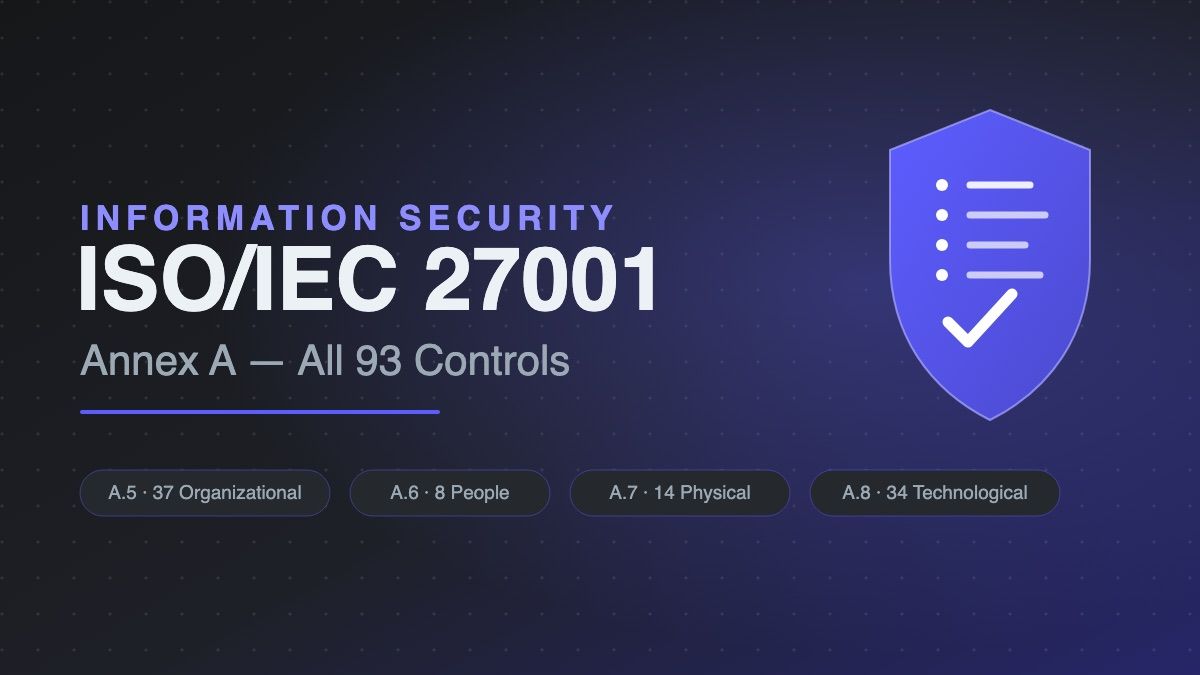
Annex A of ISO/IEC 27001:2022 is the control catalogue of the information security standard: 93 controls grouped into 4 themes — Organizational (A.5, 37 controls), People (A.6, 8), Physical (A.7, 14), and Technological (A.8, 34). The 2022 edition restructured the old 114-control, 14-domain model from ISO 27001:2013 into these four flat themes, added 11 new controls (threat intelligence, cloud services, data leakage prevention, web filtering, and others), and introduced attributes that let you tag controls by purpose, property, or cybersecurity concept. This page lists every control by reference and title with a one-line description of what it covers.
Annex A is a menu, not a mandate — your Statement of Applicability (SoA) records which controls you apply and justifies every exclusion. If you're still scoping the work, our ISO 27001 gap analysis guide covers the assessment methodology, and the free ISO 27001 Gap Analysis tool produces a scored readiness report in about 10 minutes.
Download the controls list
All 93 Annex A controls as a CSV checklist — reference, title, and theme — ready to import into your Statement of Applicability or GRC tool. The full gap analysis template (clauses 4–10 + Annex A, with scoring columns) is also available.
Working reference for self-assessment — not a substitute for the ISO/IEC 27001 standard or a formal certification audit.
How the 93 Controls Are Organized
Each theme answers a different question: who governs (Organizational), who works for you (People), where the information physically lives (Physical), and what the technology does (Technological). Unlike the 2013 edition there are no sub-domains — just four flat lists — and each control carries machine-readable attributes (control type, security properties like confidentiality/integrity/availability, NIST CSF mapping, operational capability) that make filtering and mapping easier.
- A.5 Organizational controls — 37 controls
- A.6 People controls — 8 controls
- A.7 Physical controls — 14 controls
- A.8 Technological controls — 34 controls
The Complete Controls List
A.5 — Organizational controls · 37 controls
| Ref | Control | What it covers |
|---|---|---|
| A.5.1 | Policies for information security | Establish and communicate an approved set of information security policies. |
| A.5.2 | Information security roles and responsibilities | Define and assign security roles and responsibilities across the organization. |
| A.5.3 | Segregation of duties | Separate conflicting duties so no single person can abuse a critical process alone. |
| A.5.4 | Management responsibilities | Require management to direct, support, and enforce security within their teams. |
| A.5.5 | Contact with authorities | Maintain contact procedures with regulators, law enforcement, and supervisory bodies. |
| A.5.6 | Contact with special interest groups | Maintain relationships with security forums, CERTs, and professional associations. |
| A.5.7 | Threat intelligence | Collect and use threat intelligence to inform risk decisions and defenses. |
| A.5.8 | Information security in project management | Embed security requirements and risk assessment into project management. |
| A.5.9 | Inventory of information and other associated assets | Maintain a current inventory of information, systems, and supporting assets with owners. |
| A.5.10 | Acceptable use of information and other associated assets | Define and enforce rules for acceptable use of information and assets. |
| A.5.11 | Return of assets | Ensure employees and contractors return all assets when employment or contracts end. |
| A.5.12 | Classification of information | Classify information by sensitivity so protection matches value and risk. |
| A.5.13 | Labelling of information | Label information consistently with its classification — including in exports and copies. |
| A.5.14 | Information transfer | Control information transferred internally and externally, including email and APIs. |
| A.5.15 | Access control | Establish and enforce rules for who and what can access information and systems. |
| A.5.16 | Identity management | Manage the full lifecycle of identities — provisioning, review, and deprovisioning. |
| A.5.17 | Authentication information | Control allocation and management of credentials — passwords, keys, tokens. |
| A.5.18 | Access rights | Grant, review, and revoke access rights aligned with roles and least privilege. |
| A.5.19 | Information security in supplier relationships | Manage security risks from suppliers who can access or process your information. |
| A.5.20 | Addressing information security within supplier agreements | Include security requirements and controls in contracts with suppliers. |
| A.5.21 | Managing information security in the ICT supply chain | Address security risks across the ICT product and service supply chain. |
| A.5.22 | Monitoring, review and change management of supplier services | Monitor supplier security performance and manage changes to services. |
| A.5.23 | Information security for use of cloud services | Define and manage security requirements for acquiring and using cloud services. |
| A.5.24 | Information security incident management planning and preparation | Plan, staff, and prepare incident management before an incident happens. |
| A.5.25 | Assessment and decision on information security events | Assess reported events and decide whether they become declared incidents. |
| A.5.26 | Response to information security incidents | Respond to incidents through defined procedures — contain, eradicate, recover. |
| A.5.27 | Learning from information security incidents | Analyze incidents to identify root causes and improve controls. |
| A.5.28 | Collection of evidence | Collect and preserve evidence in a way that stands up to internal and legal scrutiny. |
| A.5.29 | Information security during disruption | Maintain security during disruptions — incidents are not an excuse to drop controls. |
| A.5.30 | ICT readiness for business continuity | Ensure ICT services can meet continuity requirements during and after disruption. |
| A.5.31 | Legal, statutory, regulatory and contractual requirements | Identify and document the legal and contractual obligations your ISMS must satisfy. |
| A.5.32 | Intellectual property rights | Protect intellectual property rights — yours and third parties'. |
| A.5.33 | Protection of records | Protect records from loss, destruction, falsification, and unauthorized access. |
| A.5.34 | Privacy and protection of PII | Protect personal data per applicable privacy law — GDPR, CCPA, and equivalents. |
| A.5.35 | Independent review of information security | Have security arrangements independently reviewed — internal audit, external review. |
| A.5.36 | Compliance with policies, rules and standards for information security | Regularly check that operations actually follow the security policies you set. |
| A.5.37 | Documented operating procedures | Document and maintain operating procedures for security-relevant activities. |
A.6 — People controls · 8 controls
| Ref | Control | What it covers |
|---|---|---|
| A.6.1 | Screening | Verify candidate backgrounds proportionate to the role before hiring. |
| A.6.2 | Terms and conditions of employment | State security responsibilities in employment contracts and onboarding. |
| A.6.3 | Information security awareness, education and training | Provide ongoing security awareness and role-specific training. |
| A.6.4 | Disciplinary process | Define and communicate consequences for security policy violations. |
| A.6.5 | Responsibilities after termination or change of employment | Handle security duties that survive job changes or termination. |
| A.6.6 | Confidentiality or non-disclosure agreements | Use NDAs where needed — signed before access to sensitive information. |
| A.6.7 | Remote working | Protect information accessed, processed, or stored outside the office. |
| A.6.8 | Information security event reporting | Give personnel a clear way to report suspected security events promptly. |
A.7 — Physical controls · 14 controls
| Ref | Control | What it covers |
|---|---|---|
| A.7.1 | Physical security perimeters | Define and secure physical perimeters around sensitive areas. |
| A.7.2 | Physical entry | Control who can physically enter secured premises and areas. |
| A.7.3 | Protecting offices, rooms and facilities | Protect rooms and facilities housing information systems. |
| A.7.4 | Physical security monitoring | Monitor premises for unauthorized physical access — alarms, cameras, guards. |
| A.7.5 | Protecting against physical and environmental threats | Protect against fire, flood, power failure, and other physical hazards. |
| A.7.6 | Working in secure areas | Apply extra rules for work inside secure areas. |
| A.7.7 | Clear desk and clear screen | Keep desks and screens clear of sensitive information when unattended. |
| A.7.8 | Equipment siting and protection | Site and protect equipment against physical and environmental threats. |
| A.7.9 | Security of assets off-premises | Protect assets — laptops, phones, media — used outside your premises. |
| A.7.10 | Storage media | Manage storage media through acquisition, use, transport, and disposal. |
| A.7.11 | Supporting utilities | Protect power, cooling, and other utilities information systems depend on. |
| A.7.12 | Cabling security | Protect power and network cabling from interception and damage. |
| A.7.13 | Equipment maintenance | Maintain equipment so it stays secure and available. |
| A.7.14 | Secure disposal or reuse of equipment | Sanitize or destroy equipment before disposal or reuse. |
A.8 — Technological controls · 34 controls
| Ref | Control | What it covers |
|---|---|---|
| A.8.1 | User endpoint devices | Protect information on laptops, phones, and other endpoint devices. |
| A.8.2 | Privileged access rights | Restrict and tightly manage administrator and other privileged access. |
| A.8.3 | Information access restriction | Restrict access to information and functions per the access control policy. |
| A.8.4 | Access to source code | Control read and write access to source code and development tools. |
| A.8.5 | Secure authentication | Use strong authentication — including MFA — proportionate to access risk. |
| A.8.6 | Capacity management | Monitor and manage capacity so systems stay performant and available. |
| A.8.7 | Protection against malware | Detect, prevent, and recover from malware across systems. |
| A.8.8 | Management of technical vulnerabilities | Identify, assess, and remediate technical vulnerabilities in a timely way. |
| A.8.9 | Configuration management | Define, apply, and maintain secure baseline configurations for systems. |
| A.8.10 | Information deletion | Delete information when no longer required — beyond simple "delete" where needed. |
| A.8.11 | Data masking | Mask or anonymize sensitive data where full exposure isn't necessary. |
| A.8.12 | Data leakage prevention | Detect and prevent unauthorized extraction or exfiltration of information. |
| A.8.13 | Information backup | Back up information per policy and test restoration regularly. |
| A.8.14 | Redundancy of information processing facilities | Provide redundancy so processing keeps working through component failure. |
| A.8.15 | Logging | Record security-relevant events — who, what, when, where — in protected logs. |
| A.8.16 | Monitoring activities | Monitor systems for anomalies, attacks, and policy violations. |
| A.8.17 | Clock synchronization | Synchronize system clocks so logs correlate across the estate. |
| A.8.18 | Use of privileged utility programs | Restrict and monitor powerful utilities that can bypass controls. |
| A.8.19 | Installation of software on operational systems | Control which software can be installed on production systems. |
| A.8.20 | Network security | Protect networks and the information flowing over them. |
| A.8.21 | Security of network services | Define and manage security features and service levels of network services. |
| A.8.22 | Segregation of networks | Segment networks so compromise of one zone can't cascade. |
| A.8.23 | Web filtering | Filter access to external websites to reduce exposure to malicious content. |
| A.8.24 | Use of cryptography | Define and apply rules for encryption and key management. |
| A.8.25 | Secure development life cycle | Embed security into the software development life cycle. |
| A.8.26 | Application security requirements | Define and implement security requirements when acquiring or building applications. |
| A.8.27 | Secure system architecture and engineering principles | Apply secure architecture and engineering principles to system design. |
| A.8.28 | Secure coding | Apply secure coding standards to development. |
| A.8.29 | Security testing in development and acceptance | Test security during development and before acceptance into production. |
| A.8.30 | Outsourced development | Manage security when development is outsourced to third parties. |
| A.8.31 | Separation of development, test and production environments | Keep dev, test, and production separated — including their data. |
| A.8.32 | Change management | Control changes to systems so they don't introduce vulnerabilities. |
| A.8.33 | Test information | Protect test data — don't casually copy production data into test. |
| A.8.34 | Protection of information systems during audit testing | Ensure audit and security testing itself doesn't compromise production. |
How to Select Controls: The Statement of Applicability
Clause 6.1.3 requires you to compare your risk treatment plan against Annex A and record the result in a Statement of Applicability. For each of the 93 controls the SoA records: whether it applies, why it does or doesn't, its implementation status, and where the evidence lives. Two practical rules: first, the risk assessment drives applicability — controls exist to treat the risks you actually identified, so a generic "we excluded it" without a risk-based reason will fail a Stage 1 audit. Second, exclusions need justification, inclusions need evidence — both directions get tested.
Our Statement of Applicability guide walks through the mechanics — what auditors look for, how to word justifications, and the mistakes that draw nonconformities.
What Auditors Expect to See
For each applicable control, auditors look for evidence the control operates — not just that a policy exists. Typical evidence: the approved policy set and review records (A.5.1), an asset inventory with named owners (A.5.9), access review logs showing rights were actually reviewed (A.5.18), supplier assessments and contract clauses (A.5.19–A.5.23), incident tickets and post-incident reviews (A.5.24–A.5.28), awareness training completion records (A.6.3), visitor logs and access records (A.7.2), backup restore test results (A.8.13), vulnerability scan reports with remediation tickets (A.8.8), and change tickets linking requests to approvals (A.8.32). The pattern across all of them: documented process + records showing it ran.
Baseline Yourself in 10 Minutes
Our free ISO 27001 Gap Analysis tool walks you through the clauses and all four Annex A themes as a structured questionnaire — it produces a maturity score, a prioritized gap list, and a downloadable PDF report, entirely in your browser. It's the fastest way to find out which of these 93 controls you already satisfy and which need work before you ever talk to an auditor.
Also working on AI governance or quality management? The Annex A pattern is shared — see the ISO/IEC 42001 Annex A controls list (38 controls for AI management), the ISO 9001 Readiness Checker, and how the three standards integrate into one management system.
Frequently Asked Questions
How many controls are in ISO 27001 Annex A?
93 controls in the 2022 edition, grouped into 4 themes: 37 Organizational (A.5), 8 People (A.6), 14 Physical (A.7), and 34 Technological (A.8). The previous 2013 edition had 114 controls across 14 domains — the 2022 revision consolidated, merged, and added controls rather than simply renumbering them.
Are all 93 Annex A controls mandatory?
No. Annex A is a reference set — you select applicable controls through the Statement of Applicability based on your risk assessment and scope. What is mandatory is the process: you must compare your risk treatment plan against all 93 controls and justify each inclusion or exclusion. Some controls (like A.5.1 policies or A.6.3 awareness training) are effectively always applicable in practice.
What changed between ISO 27001:2013 and 2022 Annex A?
Three things: the 14 domains collapsed into 4 themes; the control count went from 114 to 93 (controls were merged, not just deleted); and 11 new controls arrived — including threat intelligence (A.5.7), cloud services (A.5.23), data masking (A.8.11), data leakage prevention (A.8.12), web filtering (A.8.23), and secure coding (A.8.28). Each control also gained attributes for tagging by type, security properties, and NIST CSF concepts.
What are Annex A control attributes?
Introduced in the 2022 edition, attributes are tags attached to each control — control type (preventive/detective/corrective), security properties (confidentiality/integrity/availability), cybersecurity concepts aligned to NIST CSF functions (identify/protect/detect/respond/recover), and operational capabilities. They let you filter the 93 controls into views — e.g. "all preventive confidentiality controls" — and map them to other frameworks like NIST CSF or CIS.
Do I need to map Annex A to NIST or CIS controls?
Not required, but useful. Annex A's attributes already include a conceptual link to NIST CSF functions, and Annex C of the standard cross-references ISO/IEC 27002. If you must report against multiple frameworks (SOC 2, CIS v8, NIST CSF), mapping once in your SoA or GRC tool avoids doing the assessment three times — many Annex A controls overlap substantially with those frameworks.